Chrome Extension · v1.0.7 · 100% Local · Free, Pro & Team

Capture every pixel. Record in MP4 or 4K WebM. Keep it on your device.

TabCam is a fast, privacy-first Chrome extension for seamless full-page screenshots, local MP4 & WebM screen recording with mixed audio, and a built-in Studio gallery — with zero cloud uploads.

Zero cloud uploads No all-websites permission MP4 · WebM · PNG · JPEG · A4 PDF
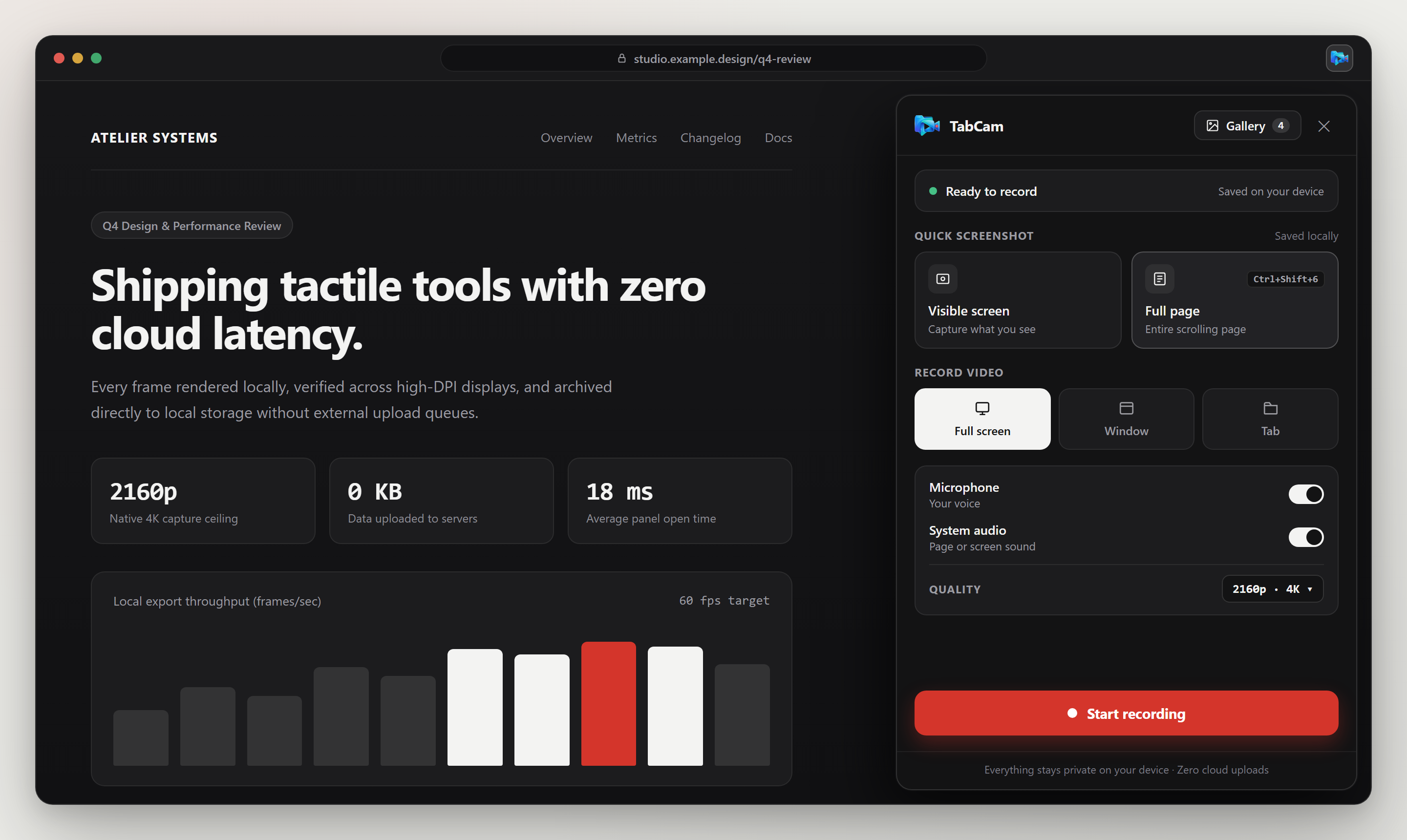
TabCam floating right-edge drawer overlay inside Chrome showing Quick Screenshot buttons, Full Screen / Window / Tab recording modes, 4K quality selector, and Start Recording control
Free / Pro / TeamGenerous free tier + optional Pro & Team plans
2160p 4KMP4 & WebM video + mic & system audio
5 PermissionsZero all-websites host access
5 Export FormatsMP4, WebM, PNG, JPEG & A4 PDF
0 Cloud Uploads100% local IndexedDB storage

What is TabCam?

TabCam is a Manifest V3 Chrome extension (v1.0.7) built for private, local-first screen capture. It records Full Screen, Application Window, or Browser Tab video in user-selectable MP4 or WebM (up to 2160p 4K at 60 fps on Pro & Team) with mixed microphone and system audio, stitches gapless full-page screenshots into PNG, JPEG, or A4 PDF, and stores every capture inside local browser IndexedDB with zero external servers.

Built for real workflows

Everything you need to capture, record, and export — without bloat.

Designed like a tactile studio tool that stays out of your way until you click the toolbar icon.

Seamless full-page & visible screenshots

Capture your current viewport in one click or scroll and stitch entire long pages automatically. TabCam neutralizes scroll-anchoring jumps and packs every slice gaplessly with zero horizontal seams. Read full-page screenshot guide.

  • Visible screen capture or automatic full-page scrolling capture
  • Trigger full-page capture instantly with Ctrl+Shift+6
  • Export lossless PNG, lightweight JPEG, or multi-page A4 PDF
  • One-click Copy to clipboard right from TabCam Studio
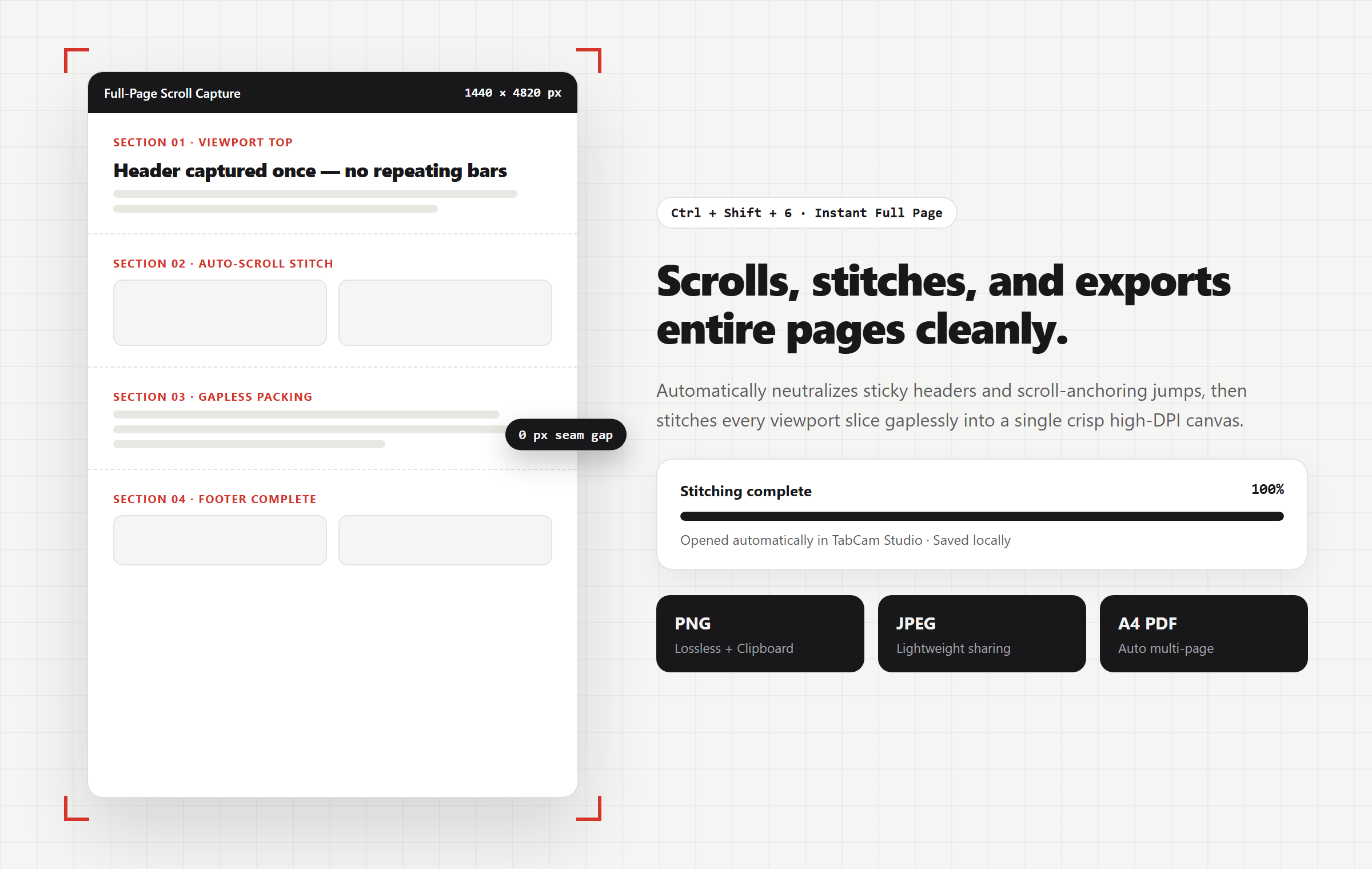
TabCam full-page scrolling screenshot capture stitching a long webpage with zero seam gaps and exporting to PNG, JPEG, or multi-page A4 PDF

Local MP4 & 4K WebM recording with crash-safe storage

Record your entire screen, an application window, or a single browser tab in MP4 or WebM up to 2160p 4K · 60 fps — complete with live microphone and system audio mixing. Read 4K recording guide.

  • User-selectable MP4 (H.264 + AAC) and WebM (VP9/VP8) on all plans
  • Five quality presets: 480p, 720p (Free), plus 1080p, 2K & 4K (Pro)
  • Live microphone & system audio level meters with instant mute controls
  • Streams chunks continuously to local IndexedDB — safe against crashes & memory spikes (how recovery works)
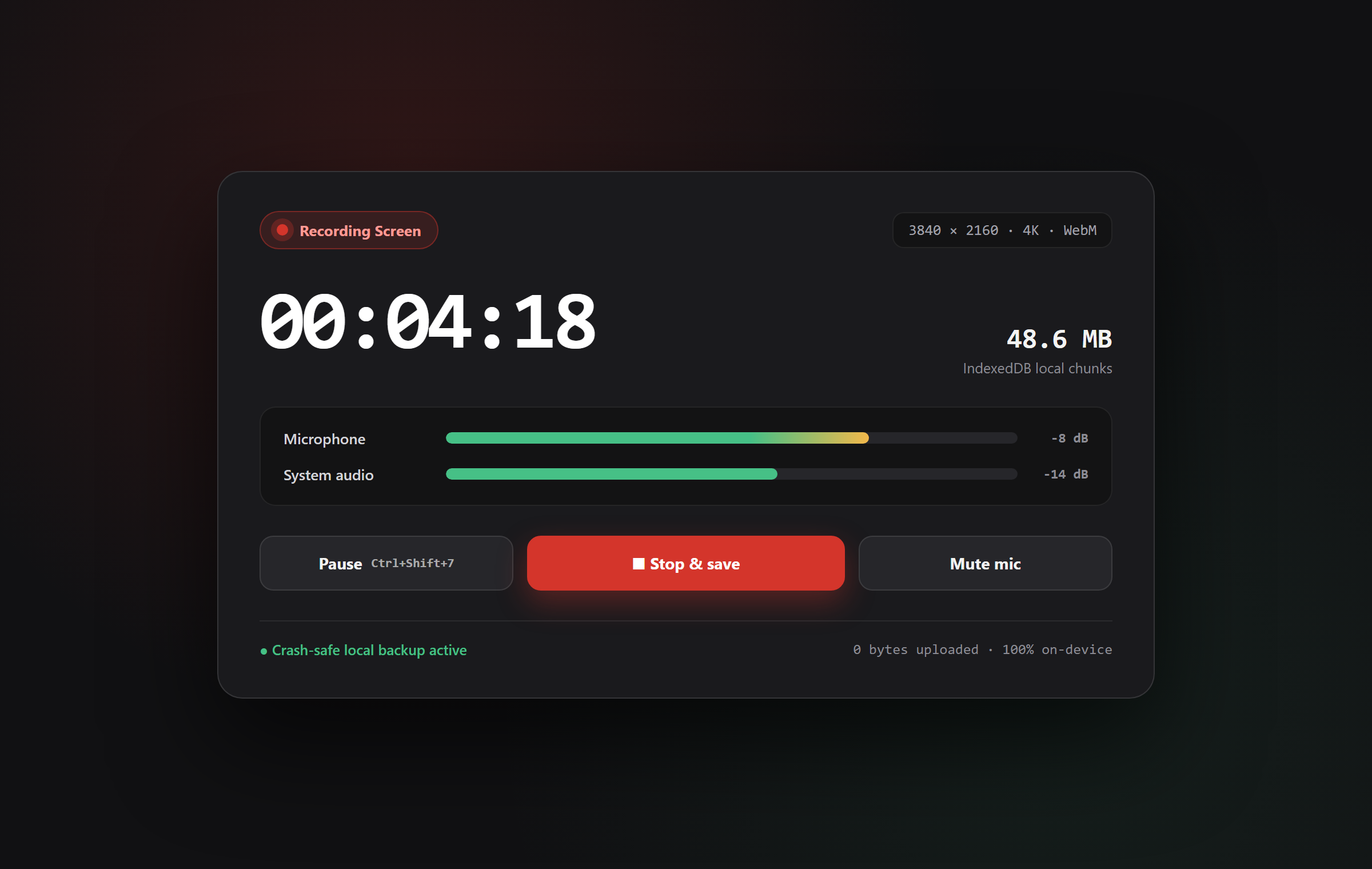
TabCam live 4K recording panel showing elapsed timer, live microphone and system audio meters, pause and stop controls, and crash-safe local IndexedDB storage indicator

TabCam Studio — your local media viewer & gallery

Every screenshot and recording lands cleanly inside TabCam Studio on your device. Inspect captures with smart auto-fit zoom, search past items instantly, and export in the format you need.

  • Smart auto-fit zoom automatically frames wide or tall captures comfortably
  • Instant search bar and type filters (All, Images, Videos) with live counts
  • Built-in WebM video player and 1-click re-download from local backups
  • Adaptive Warm Paper light mode and True Carbon dark mode
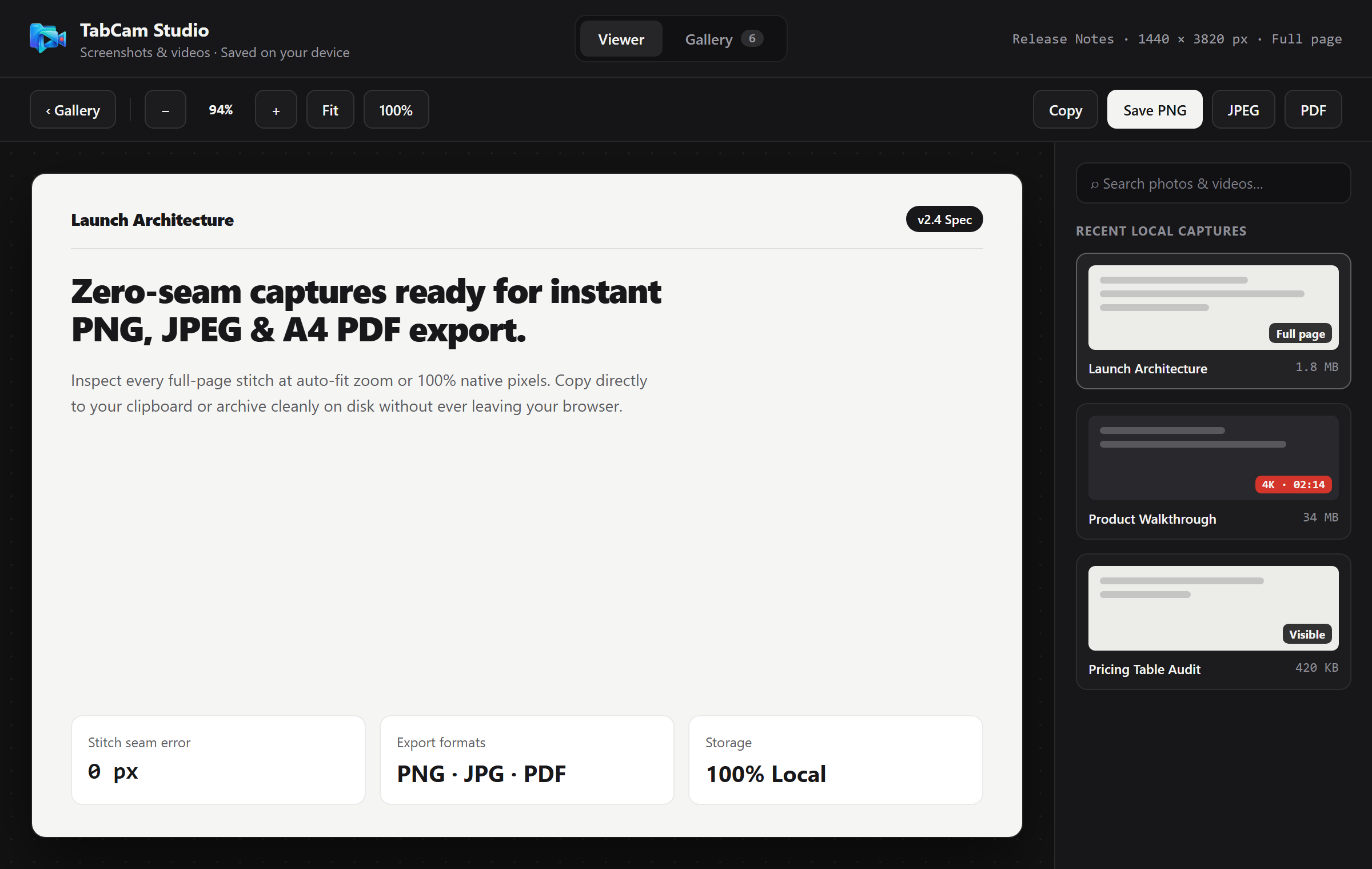
TabCam Studio viewer and media gallery displaying zoom controls, Copy, Save PNG, JPEG, PDF export buttons, and local screenshot and video thumbnails

How it works

How does TabCam work in 3 steps?

Open the right-edge drawer, pick screenshot or 4K video with optional audio, and export locally from TabCam Studio — with zero accounts or floating site toolbars.

01

Open the floating drawer

Click the TabCam icon in your Chrome toolbar. An isolated Shadow DOM overlay drawer slides open along the right edge of your tab — click outside or press Esc to dismiss it anytime.

02

Capture or record locally

Snap the visible viewport, stitch an entire scrolling webpage (Ctrl+Shift+6), or record Full Screen, Application Window, or Browser Tab video in MP4 or WebM with Microphone and System audio.

03

Review and export from TabCam Studio

Open TabCam Studio on your device to inspect captures with auto-fit zoom, copy PNG straight to clipboard, export JPEG or multi-page A4 PDF, or download your MP4 or WebM video directly to disk.

Full-page screenshotCtrl+Shift+6
Pause / resume recordingCtrl+Shift+7
Stop & save recordingCtrl+Shift+8

Deep-Dive Guides

Learn every local capture workflow in detail.

Step-by-step technical walkthroughs covering full-page stitching, 4K audio mixing, and crash-safe IndexedDB storage.

Architecture Comparison

How does TabCam compare to cloud screen recorders?

Most browser recorders require accounts, request access to every website you visit, and upload video to remote servers. TabCam keeps capture, encoding, and storage 100% local — starting free with optional Pro and Team plans.

CapabilityTabCam (Local-First)Typical Cloud Recorders
Pricing & WatermarksFree ($0) up to 720p/60m · Pro $5/mo ($29/yr) · Team 5/10/50 seats · zero watermarks5-minute free limits, forced watermarks, or expensive per-seat cloud tiers
Data Processing Location100% on-device (browser MediaRecorder + local IndexedDB)Uploaded to remote vendor cloud servers for storage & transcoding
Host Permissions0 broad host permissions — uses on-demand activeTab onlyOften requests 'Read and change all your data on all websites'
Video Formats & ResolutionUser-selectable MP4 (H.264 + AAC) & WebM (VP9/VP8) up to 2160p 4K at 60 fps720p on free tiers; cloud transcoding delays before download
Full-Page Scrolling ScreenshotsBuilt-in gapless stitching + PNG, JPEG, multi-page A4 PDF (all plans)Usually requires a separate screenshot extension
Want the full 8-point technical comparison?

Review permissions, crash recovery, 4K bitrate handling, and privacy trade-offs.

Compare Local vs. Cloud

Radical transparency

How does TabCam protect your privacy with 5 permissions?

Instead of asking to "Read and change all your data on all websites," TabCam relies on Chrome's activeTab permission model and Manifest V3 offscreen documents — acting strictly on the tab you invoke it on.

activeTab

Grants temporary access to the current tab only after you click TabCam or press its shortcut.

scripting

Mounts the right-edge drawer and smoothly scrolls the active page during full-page capture.

offscreen

Runs the MediaRecorder and Web Audio mixer reliably in the background while you switch tabs.

storage

Saves your audio, quality, and capture preferences locally inside your browser profile.

downloads

Exports finished MP4 or WebM videos and PNG, JPEG, or PDF files directly to your Downloads folder.

100% On-Device Privacy Guarantee

No servers, no telemetry, no analytics scripts, and no account required — ever.

Read Security & Permissions

Questions & Answers

Frequently asked questions

Last updated: November 26, 2026 · Applies to TabCam v1.0.7

What is TabCam and how does it protect my privacy?

TabCam is a local-first Chrome Manifest V3 extension (v1.0.7) for MP4 and WebM screen recording and full-page screenshots. Every screenshot, stitched page, audio track, and video chunk is processed strictly inside your browser's local IndexedDB storage with zero cloud uploads and zero telemetry.

Does TabCam upload my screenshots or recordings anywhere?

Never. Every screenshot, full-page stitch, and video chunk (MP4 or WebM) is processed and stored strictly inside your browser's local storage (IndexedDB) and saved directly to your computer when you export.

Why doesn't TabCam ask to 'Read and change all data on all websites'?

Because you shouldn't have to grant permanent access to your banking, email, or private tabs just to take screenshots. TabCam uses Chrome's activeTab model and requests only 5 minimal Manifest V3 permissions (activeTab, scripting, offscreen, storage, downloads), so it only touches the page you explicitly invoke it on.

What video formats, resolutions, and export options are supported?

Users can choose between MP4 (H.264 + AAC, universal playback) and WebM (VP9/VP8, compact size) on every plan, with resolutions from 480p and 720p on Free up to 1080p Full HD, 1440p 2K, 2160p 4K, 60 fps, and custom bitrates on Pro and Team. Screenshots can be copied as PNG or exported as lossless PNG, JPEG, or multi-page A4 PDF on all plans.

What happens if Chrome crashes or closes during a long recording?

TabCam streams each recorded media chunk continuously to local IndexedDB rather than holding the entire video in RAM, and monitors available storage quota every 5 seconds. If a save or download is interrupted, you can recover and re-export the committed recording from your local TabCam Studio backup.

Does TabCam work on Brave, Microsoft Edge, and other Chromium browsers?

Yes. TabCam targets Google Chrome 123 or newer as its baseline and runs on modern Chromium browsers including Brave and Microsoft Edge across Windows, macOS, and Linux. Restricted internal pages (such as chrome:// or extension store pages) automatically fall back to a compact docked window so recording controls remain accessible.

What is included in Free vs. Pro and Team?

TabCam Free ($0) includes MP4 & WebM recording up to 720p at 30 fps (up to 60 minutes per recording), 50 screenshots per month, and all Studio exports (Copy, PNG, JPEG, A4 PDF) with zero watermarks. TabCam Pro ($5/mo or $29/yr, up to 3 devices) unlocks 1080p/2K/4K, 60 fps, custom bitrates, and unlimited recording length and screenshots. TabCam Team adds shared naming templates, JSON preset sync, and Chrome Enterprise policy deployment in 5, 10, or 50 seat tiers starting at $19/mo ($119/yr).

Ready for calm, local screen capture?

Install TabCam in seconds and capture your first full-page screenshot or 4K recording — completely private on your device.